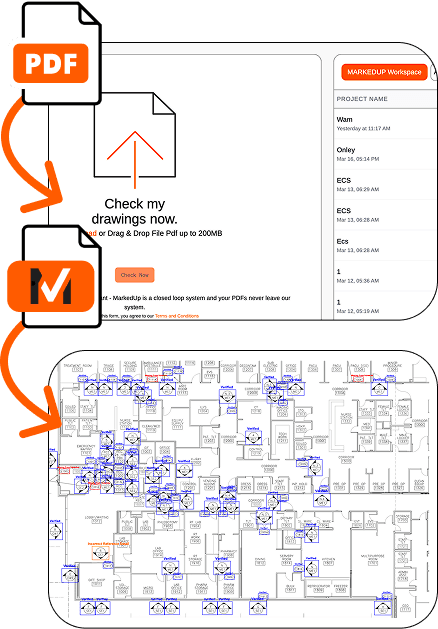
1. You upload PDF drawings.
2. QC the set: Bluebeam-ready findings.
3. View issues as a PDF.
1. You upload PDF drawings.
2. QC the set: Bluebeam-ready findings.
3. View issues as a PDF.
Backed by Mark Cuban

MarkedUp is the audit layer for construction drawings. Catch sheet index, callout, door-schedule, keynote, and MEP errors before they become rework, delays, and claims. Resolve issues with One-Click RFI. We don't train on your project files. Unlimited users, one flat price every 90 days or per year.
Read how to write a good RFI.
Without leaving
Get notified of issues via


No training on your project files | Uploaded files are deleted within 14 days as standard | Bluebeam-ready findings
1. You upload PDF drawings.
2. QC the set: Bluebeam-ready findings.
3. View issues as a PDF.
1. You upload PDF drawings.
2. QC the set: Bluebeam-ready findings.
3. View issues as a PDF.





MarkedUp is an intelligent invisible layer inside the tools you already trust. While others provide a "first-pass," MarkedUp provides a final audit.
Upload your architectural, structural, and MEP drawings. We handle the heavy lifting.
We export all found issues as standardized markups directly into a PDF opened in Bluebeam, Autodesk, or wherever you manage PDFs today. Procore is Coming soon.
Your team resolves them exactly as they do today, just without the manual searching grind.
Direct integrations with 👉


 Coming soon


 Coming soon
Book a meeting. We run a project with you, then start a 90-day pilot at $1,500 per office. After the pilot, renew at $1,500 every 90 days per office or switch to $5,000 per office per year.
Results may be held if drawing quality isn’t audit-ready. We don’t promise every upload gets a full pack.
$1,500 / office
The first 90 days are a pilot at $1,500 per office. After the pilot, renew at $1,500 every 90 days per office or switch to $5,000 per office per year.
$5,000 / year
Per office, per year.
Each plan includes one integration method. Connect to: Forma, Trimble, SharePoint Online, Teams and more. Procore is Coming soon.
Whether you issued the set or you're about to build from it, undetected errors cause the same damage: rework, RFIs, back-charges, and blown schedules.
Don't lock your GMP on uncoordinated bid sets.
Elevate QA/QC standards without adding billable hours.
You're drowning in coordination.
Protect project margins by catching coordination gaps.
Audit Check 01:
Your Contractual Baseline, Verified.
Audit Check 02:
Stop The Domino Effect.
Audit Check 03:
Prevent The Procurement Disaster.
Audit Check 04:
Every Note On Every Sheet, Accounted For.
Generic LLMs hallucinate, and basic construction AI tools only scan text. MarkedUp reads drawing geometry, symbols, and cross-sheet references, then returns Bluebeam-ready findings.
AEC Context
Manual QA/QC: High (Human)
Generic AI (ChatGPT): Low (Hallucinates)
MarkedUp: High (AEC-Trained)
PDF Processing
Manual QA/QC: Hours/Days
Generic AI (ChatGPT): Text Only (No Vector)
MarkedUp: Vector-native
Data Privacy
Manual QA/QC: Internal Only
Generic AI (ChatGPT): Public Training Data
MarkedUp: No training on your project files.
Output Type
Manual QA/QC: Hand Redlines
Generic AI (ChatGPT): Chat Text
MarkedUp: Bluebeam-Ready PDF
| Feature | Manual QA/QC | Generic AI (ChatGPT) | MarkedUp |
|---|---|---|---|
| AEC Context | High (Human) | Low (Hallucinates) | High (AEC-Trained) |
| PDF Processing | Hours/Days | Text Only (No Vector) | Vector-native |
| Data Privacy | Internal Only | Public Training Data | No training on your project files. |
| Output Type | Hand Redlines | Chat Text | Bluebeam-Ready PDF |
See how GCs use MarkedUp to catch door-schedule and callout risks before bid, without a new drawing system.



As a construction engineer, I watched my wife's brother lose $100,000 on a single project because of errors nobody caught. I built MarkedUp so nobody, architect or GC, ever absorbs that loss again.
Christopher J. Mouflard, Co-Founder
An invisible audit layer that catches drawing errors before they become rework, delays, and claims. View and manage issues in the tools you already use: drag-and-drop, or audit files directly in SharePoint, Autodesk, Trimble and more. Procore is Coming soon.
No. No new system of record. No dashboard to remember. Just findings where your team already works.
As markups on your drawings, in the tools your team already uses. With Bluebeam Session, MarkedUp pushes flagged markups into the Studio Session you already run. With a connected folder in Autodesk Forma, Google Drive, Trimble Connect, Trimble ProjectSight, or SharePoint Online, the marked-up result comes back to that folder. One-Click RFI is a live paid add-on: MarkedUp finds issues, you create RFIs from them, bundle several together, and send them as an email from your own inbox or push them to Autodesk and Trimble, with Procore coming soon. Slack or Microsoft Teams notifications keep the team in the loop.
ConstructionProof is the drag-and-drop path into MarkedUp. Upload a PDF drawing set, get a scoped integrity audit back, and open the findings where your team already works. The name is the ease pun (so easy it’s construction-proof), not a second product.
Live today: Bluebeam Session, Autodesk Forma, Google Drive, Trimble Connect, Trimble ProjectSight, SharePoint Online, MCP, Slack notifications, and Microsoft Teams notifications. One-Click RFI is a live paid add-on. Procore is Coming soon.
MarkedUp checks that the sheet index matches the sheet numbers, callouts point to real details, door tags match the schedule and plan, keynotes match the plan and legend, and MEP equipment and panels match the plan. Run the check before the set becomes someone else’s problem.
Book a meeting. We run a project with you, then start a 90-day pilot at $1,500 per office. After the pilot, renew at $1,500 every 90 days per office or switch to $5,000 per office per year. Each plan includes one integration method. Connect to: Forma, Trimble, SharePoint Online, Teams and more. Procore is Coming soon.
Uploaded files are deleted within 14 days as standard. A certificate of deletion is available on request.
No training on your project files | Uploaded files are deleted within 14 days as standard | Bluebeam-ready findings